


Celrien | Glowing Acrylic Drawing Board – LED-Lit Display, Wipe & Redraw, Creative Desk Art That Glows
Limited stock – this product is popular
 Free shipping
 30 days worry-free return
 Safe & secure checkout
🍂LIMITED FALL OFFER🍂


A Glowing Space For Little Creative Ideas
Draw and write on a reusable acrylic surface, then illuminate creations with LED light for an eye-catching desk display.
EVERYDAY FUNCTION, THOUGHTFUL DESIGN
Why You'll Love The Details
Explore the practical functions, product finishes and everyday use possibilities below.
LED-Lit Display
An illuminated acrylic panel makes drawings stand out when powered.
Wipe And Draw Again
Clean the reusable writing surface and start a fresh picture.
Three Size Options
Choose S, M or L to suit the available space.
Display Stand
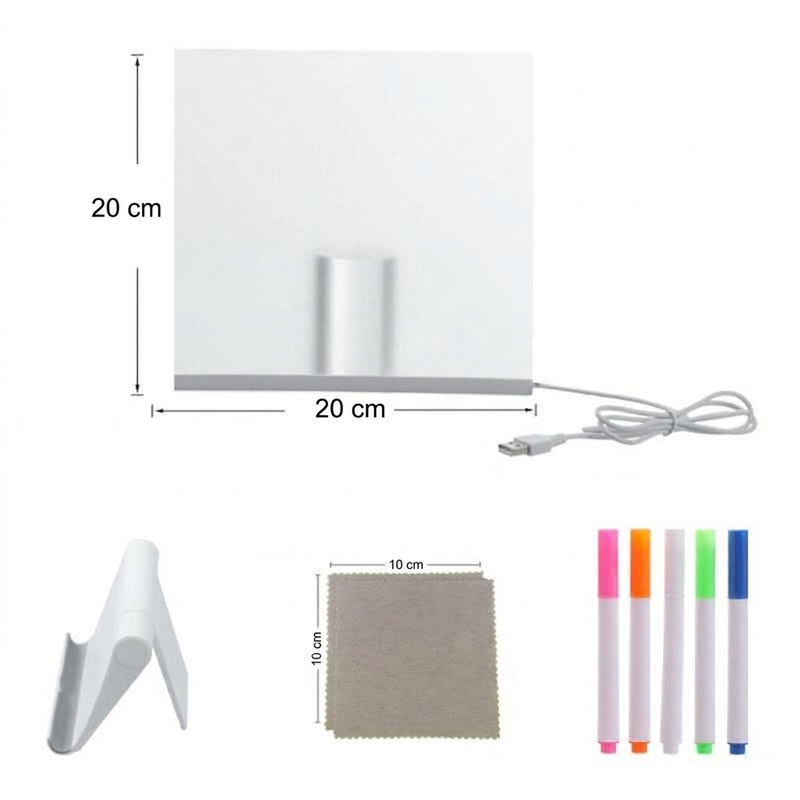
The original listing includes a stand for displaying the acrylic board.

A Little Canvas With A Glow
The LED display lets drawings become part of a colourful desk or shelf arrangement.

Reuse The Drawing Space
Wipe away marks made with suitable erasable pens to create something different.

Create Personal Messages
Use the board for pictures, simple lettering or fun small reminders.

Show Off The Finished Artwork
Illuminate a design on a suitable stable surface with the included stand.
Choose The Right Size
Check the dimensions and accessories associated with the selected size before ordering.
How To Use & Get Started
Remove Protective Film
Peel off the protective film before writing on the acrylic.
Draw With Supplied Pens
Use the suitable erasable pens provided for your chosen style.
Illuminate And Wipe Clean
Power with a compatible USB supply; wipe the surface with the supplied cloth.
Specifications & Options
📦 Package Includes
1 × Acrylic drawing board, 1 × stand, coloured pens (style-dependent), 2 × cleaning cloths, as source-listed
⚠ Important Use & Care Notes
- Adult supervision is recommended; follow the packaging age recommendations.
- Use only compatible erasable markers; avoid permanent ink.
- Keep electrical connections dry and use a suitable USB supply.
- Remove the protective film before first use and avoid abrasive cleaning materials.